Atliso ProFirst scan free
Intune says compliant. Your devices say otherwise.
Atliso Pro connects to your tenant in two minutes and checks what the Intune dashboards don't: BitLocker keys that never reached Entra ID, LAPS passwords that stopped rotating, Windows versions out of support, Apple certificates about to lapse. Then it deploys the tested fix.
First scan free, no card. Daily checks and fixes: 30-day trial, card required. Read-only, no agent. Already using it? Sign in
Connects directly to
 Microsoft Intune
 Microsoft Entra ID
 Microsoft Graph
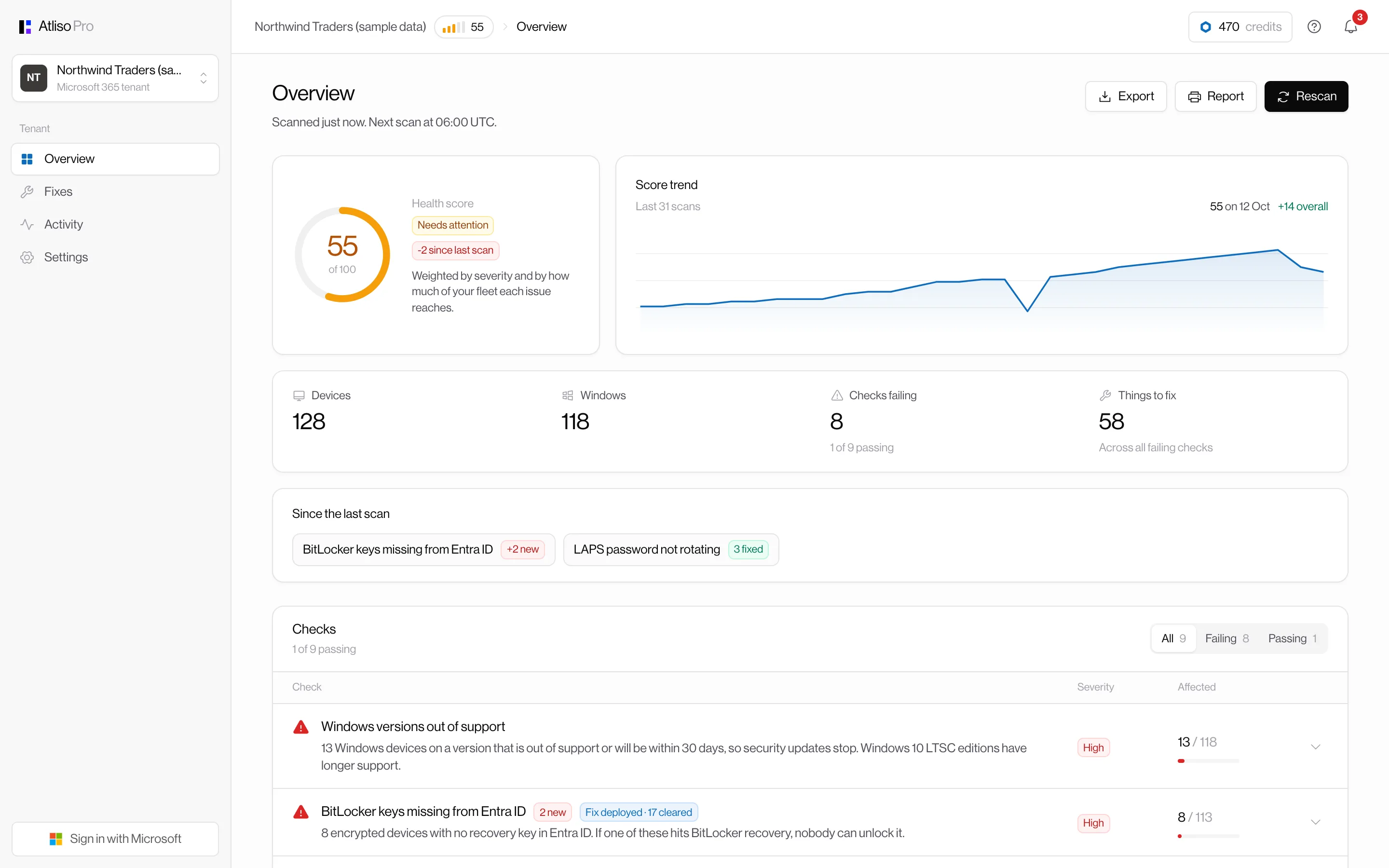
Ten checks, every morning
Each one is a problem admins write to us about, the kind Intune reports as fine.
BitLocker keys missing from Entra ID
Encrypted devices whose recovery key never reached Entra. The ones nobody can unlock.
Drives not encrypted or protection off
Including drives stuck on "waiting for activation".
LAPS passwords not rotating
Intune shows compliant, the password has not changed in months.
No LAPS password at all
Devices with an unmanaged local admin account.
Remediations failing quietly
Scripts that error or fix nothing, per script, with counts.
Devices that stopped checking in
Lost, broken or forgotten machines skewing every report.
Non-compliant devices
Who Conditional Access is already blocking, and why.
Windows versions out of support
Windows 10, and Windows 11 releases at or near their end date. Checked by edition, because Pro and Enterprise on the same build end a year apart.
Apple certificates expiring
The push certificate and enrolment tokens, 30 days before they lapse and break enrolment.
Licensing for Remediations
Whether your licences include Remediations at all.
Everything a team needs around it
Instant alerts
Email, Microsoft Teams or Slack the moment a high-severity check gets worse, the score drops, or access is lost. You set the rules.
Daily or weekly digest
Score, what changed and what is still open, on the day you choose.
Fix tracking
Each deployed fix shows how many devices it has cleared since, scan by scan.
Notification centre
Every change from every scan in one feed, with an unread count.
Team roles
Owners and viewers, invite by email, sign in with Microsoft. No shared logins.
Audit log
Who connected, deployed, changed a setting or invited someone, and when.
Tune the checks
Your own thresholds, turn checks off, and exclude kiosks or lab machines by name.
Reports
Score trend, CSV export of every finding, and a printable report for the next review.
Connected in two minutes
- 01
Sign in with Microsoft
Use your work account. No new password to manage.
- 02
Approve read access
A Global Admin approves Atliso Pro on Microsoft's consent screen. Revoke it any time in Entra ID.
- 03
Get your free report
About a minute, free, no card. The 30-day trial (card required) adds daily re-checks and alerts when things get worse.
Fix it, don't just report it
Every finding comes with the Atliso fix that was built and lab-tested for it. One click adds it to Intune Remediations, unassigned, so you pilot it on your terms. The next morning's scan shows which devices dropped off the list.
Stuck on something unusual? The AI fix plan turns a finding into numbered steps using your numbers, with the exact Intune and Entra paths.
What it can see
DeviceManagementManagedDevices.Read.AllList Intune devices, encryption and compliance state
BitlockerKey.ReadBasic.AllSee which devices have a recovery key in Entra ID (never the key itself)
DeviceLocalCredential.ReadBasic.AllSee when LAPS passwords were last backed up (never the password)
DeviceManagementScripts.ReadWrite.AllRead remediation results, and add Atliso fixes when you click Deploy
Organization.Read.AllTenant name and licences, to know whether Remediations are available
DeviceManagementServiceConfig.Read.AllExpiry dates of the Apple push certificate and enrolment tokens
DeviceManagementApps.Read.AllExpiry dates of Apple Apps and Books tokens
ProfilePhoto.Read.AllShow your team's Entra profile photos in Atliso Pro
Pricing
Your first scan is free, with no card. For daily checks, fixes and alerts, every plan starts with 30 days free: add a card, nothing is charged until day 31, and you can cancel any time before.
Team
Most teams£29/ month
One tenant, up to 1,000 devices.
- Daily checks and score trend
- One-click tested fixes
- Alerts to email, Teams or Slack
- Team roles and audit log
- AI fix plans
Free scan first. Then 30 days free with a card, cancel any time.
MSP
£12/ tenant / month
Every customer tenant from one account. Minimum five tenants.
- Everything in Team
- Portfolio view, worst first
- Per-tenant alert rules
- Invite each client as viewers
Free scan first. Then 30 days free with a card, cancel any time.
Questions admins ask
What do I get for free?
One full scan of one tenant, with every finding and affected device, plus one AI fix plan. No card needed. Daily scans, one-click fixes, alerts and more AI plans come with the 30-day trial, which needs a card. Nothing is charged until day 31, and you can cancel any time before.
Do I install anything on devices?
No. Atliso Pro reads Intune and Entra ID through Microsoft Graph. Fixes run through Intune Remediations, the same way you deploy anything else.
Can it change my tenant?
Only when you press Deploy, and only by adding a remediation that is not assigned to anyone. You choose the pilot group in Intune before anything runs.
Does it read recovery keys or passwords?
No. It asks for the "ReadBasic" permissions, which show whether a key or password exists and when it was backed up, never the secret itself.
We are on Business Premium.
Everything works. Without Remediations licensing (E3/E5, A3/A5 or VDA), Atliso Pro deploys each fix as an Intune platform script instead, still unassigned.
What does the AI do?
It writes a step-by-step plan for a finding from your numbers. Device names and users are never sent, and spend is capped per tenant.
I manage several clients.
Connect each customer tenant from the same account and see them all on one portfolio page, worst first. Each tenant needs one of its own admins to approve access.
Who on my team can see it?
Invite colleagues as owners (deploy fixes, change settings) or viewers (see everything, get alerts). Every change is in the audit log.
See your tenant's score in two minutes
Your first scan and an AI fix plan are free, with no card. Sign in with Microsoft, approve read access, and the scan runs straight away.
Get your free scan