Apple MDM push certificate expired in Intune? Check all 3 Apple dates
Quick answer
Intune has three Apple dates that expire every year. The push certificate is the one that matters: renew it with a different Apple ID and every Apple device re-enrols.
- 1.Push certificate: valid 365 days, with a 30-day grace period after expiry. Renew it in Intune under Devices > Device onboarding > Enrollment > Apple > Apple MDM Push Certificate. In the Apple portal, choose Renew, never Create, and use the same Apple ID. A different Apple ID means every Apple device re-enrols.
- 2.ADE token: renew yearly. When it lapses, new and wiped devices can't enrol through Automated Device Enrollment. Download a new token from Apple Business Manager and upload it to the existing token in Intune.
- 3.VPP token: valid one year. When it lapses it shows Invalid and app licensing stops syncing. Download a new content token from Apple Business Manager and upload it to the existing token.
- 4.Run the script below to see all three dates and which Apple ID owns each one.
An iPhone stops picking up policies. Then all of them do. Somebody opens Intune and finds a yellow banner on the Apple enrolment page that has been there for a month, pointing at a certificate created three years ago by an Apple ID nobody can sign in to.
Intune has three Apple dates that expire every year: the MDM push certificate, the enrolment program (ADE) token and the Apps and Books (VPP) token. Two of them are an annoyance when they lapse. One of them, renewed the wrong way, means re-enrolling every iPhone, iPad and Mac you manage.
This guide shows what each one breaks, how to renew it without making things worse, and a read-only script that lists all three dates in one go.
Three dates, three different blast radiuses
| What | Lasts | When it lapses | Renewed with the wrong Apple ID |
|---|---|---|---|
| Apple MDM push certificate | 365 days, then 30-day grace | Intune can't talk to Apple devices | Every Apple device re-enrols |
| ADE (enrolment program) token | 1 year | New and wiped devices can't enrol through ADE | Enrolled devices are fine until they re-enrol |
| Apps and Books (VPP) token | 1 year | Shows Invalid, app licence sync stops | Re-upload the new token to the same entry |
The push certificate is the one that matters. Intune doesn't send anything to an iPhone directly. It asks Apple's push service to wake the device up, and the certificate is how Apple knows the request is yours. Each device is enrolled against that certificate's topic. Swap the certificate for one under a different Apple ID and the topic changes. Every enrolled device is now listening for a certificate that no longer exists. That's why an APNs certificate on a different Apple ID is the one mistake you can't undo with a quick fix.
Already expired? Read this before you click anything
Microsoft documents a 30-day Apple push certificate grace period after the certificate expires. Inside it, a normal renewal brings everything back. Past it, try the same thing first: sign in to the Apple Push Certificates Portal with the original Apple ID and select Renew on the existing certificate. Creating a new certificate is the step that forces re-enrolment, so make it the last option, not the first.
Don't test what happens on day 31.
The two mistakes that turn a renewal into a re-enrolment project:
- Clicking Create a Certificate instead of Renew. It produces a new topic.
- Signing in with a different Apple ID, because nobody knows the original one.
Find out which Apple ID owns each one
In Intune, the Apple MDM Push Certificate page shows the Apple ID that created the certificate, and the token pages show theirs. The script below pulls all of them into one table.
If the Apple ID turns out to be a personal address or a leaver's mailbox, sort out access before the renewal date, not on it. For the push certificate you can't move to a different Apple ID without re-enrolling, so the fix is to get back into the original account: reset its password, or get the leaver's mailbox redirected so the reset email lands somewhere.
Microsoft's advice for next time: use an organisation Apple ID tied to a shared mailbox that more than one person reads. That mailbox also gets Apple's reminder emails, which Apple sends about 30 days and 10 days before expiry.
Renew the Apple MDM push certificate in Intune (same Apple ID)
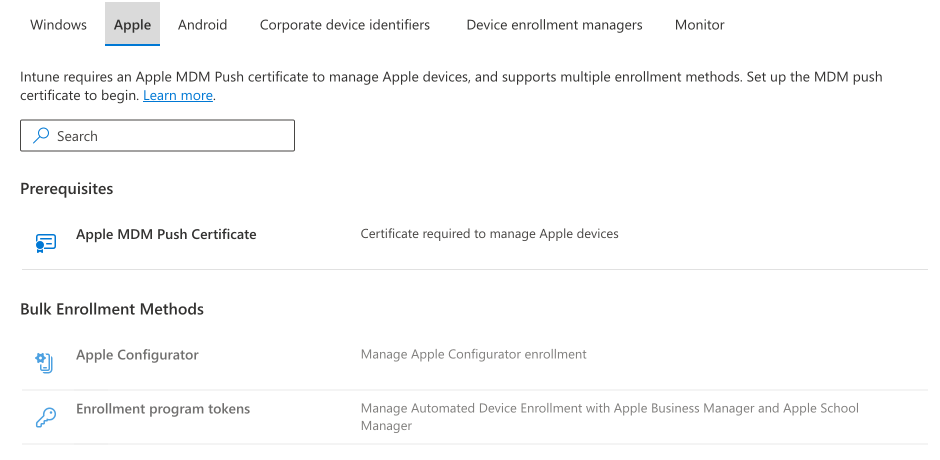
- Intune admin center > Devices > Device onboarding > Enrollment > Apple tab > Apple MDM Push Certificate.
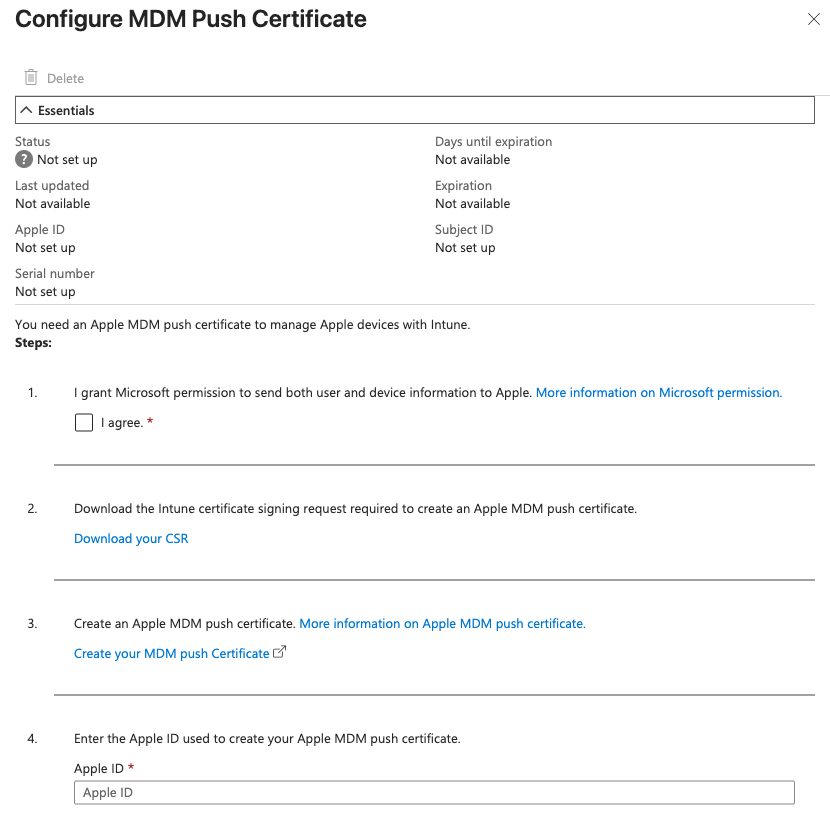
- Tick the agreement, then Download your CSR.
- Select Create your MDM push Certificate. This opens identity.apple.com. Despite the button's name, you are renewing.
- Sign in with the same Apple ID shown in Intune. Find the certificate (match the expiry date or the Topic) and select Renew.
- Upload the CSR, add a note you'll recognise next year, then download the new
.pemfile. - Back in Intune, enter the same Apple ID, upload the
.pemand save. - Check that the status shows active and the expiry date moved forward a year, in both Intune and the Apple portal.
Renew the ADE token
If the Intune ADE token has expired, or is about to, the Apple Business Manager token renewal in Intune takes three steps:
- Apple Business Manager > Preferences > your MDM server > Download Token.
- Intune > Devices > Device onboarding > Enrollment > Apple > Enrollment program tokens. Select the token, then Renew token, and upload the file.
- Sync the token and check the new expiry date.
Renew the existing token. Don't add a second one. Your enrolment profiles hang off the existing token.
Renew the VPP token
An Intune VPP token that has expired shows Invalid, and app licences stop syncing until you replace it:
- Apple Business Manager > Preferences > Payments and Billing > Apps and Books > Content Tokens > Download for the right location.
- Intune > Tenant administration > Connectors and tokens > Apple VPP tokens. Select the token, select Edit on Basics, upload the new file and save.
- Refresh until the expiry date updates. Intune can take a while to show it.
Two things not to do:
- Don't delete the token to start fresh. Deleting it removes the associated apps and assignments, and Intune can't revoke those licences afterwards.
- Don't upload the same token to another MDM or another Intune tenant. Microsoft warns it can lose licence assignments.
Check every Intune Apple token expiry date with PowerShell
Atliso-AppleTokenAudit.ps1 signs in to Microsoft Graph with read-only scopes. It lists the push certificate, every ADE token and every VPP token with the expiry date, days left and the Apple ID behind each one. It flags personal Apple IDs and invalid VPP tokens, and exports a CSV.
What you need:
- The
Microsoft.Graph.Authenticationmodule. - An account that can read Intune configuration. It requests
DeviceManagementServiceConfig.Read.AllandDeviceManagementApps.Read.All, plusDeviceManagementManagedDevices.Read.Allto count Apple devices. All delegated, all read-only.
Install-Module Microsoft.Graph.Authentication -Scope CurrentUserThe CONFIG block at the top:
# ===== CONFIG =====
$OutputPath        = Join-Path $env:USERPROFILE 'Desktop\Atliso-AppleTokens.csv'
$WarnDays          = 60     # flag anything that expires within this many days
$CriticalDays      = 14
$CountAppleDevices = $true  # count the Apple devices that depend on the push certificate
$LogPath           = Join-Path $env:LOCALAPPDATA 'Atliso\AppleTokenAudit.log'
# ==================
Run it:
.\Atliso-AppleTokenAudit.ps1It exits 1 if anything is expired, invalid or inside the warning window. Schedule it monthly and treat exit 1 as a ticket. MSPs can pass -TenantId to run it against each customer tenant.
What it doesn't do: it doesn't renew anything. Apple's portal needs an interactive sign-in with the right Apple ID, which is the whole point. It also doesn't read Apple Business Manager, so a token that exists in ABM but was never uploaded to Intune won't show.
Questions admins ask
Can I change the Apple ID on the push certificate?
Only by creating a new certificate, which means every Apple device re-enrols. If you're stuck with a personal or leaver's Apple ID, recover access to it instead.
I renewed late. Do devices need re-enrolling?
Not if you renewed the existing certificate with the same Apple ID inside the 30-day grace period. Devices pick it up as they check in. If devices still don't respond afterwards, check that the Topic on a device matches the certificate in the Apple portal.
Does Intune warn me before it expires?
Intune shows a warning in the admin center's Apple enrolment page, and Apple emails the Apple ID about 30 days and 10 days out. Neither helps if nobody opens that page or reads that mailbox.
Does an expired ADE token unenrol devices?
No. Enrolled devices keep working. New and wiped devices can't enrol through ADE until it's renewed.
Why does my VPP token say Invalid when it hasn't expired?
The Managed Apple ID behind it changed: a password change, a domain change or a disabled account. Download a new content token and upload it to the same entry.
Check it every night, not once a year
These dates come round once a year, which is exactly why nobody remembers them. A script you run today tells you about today. It's the same problem as Windows 11 24H2 end of support, with a different date.
Atliso Pro checks the push certificate, every ADE token and every VPP token in your tenant every night. It flags anything inside 30 days, and it can alert your team by email, Teams or Slack, so the renewal lands in a channel people read rather than a mailbox nobody does. The first scan is free and takes about two minutes. See the sample report first if you'd rather.
Sources
- Microsoft Learn: Get an Apple MDM push certificate for Intune
- Microsoft Learn: Set up an ADE token (Apple)
- Microsoft Learn: Manage Apple volume-purchased apps (VPP) with Intune
- Microsoft Graph: applePushNotificationCertificate, depOnboardingSetting (beta), vppToken
- Practical365: Renewing the Apple device enrolment certificate in Intune
Get the Apple Token Audit script
Free and MIT licensed. Drop your email and the vault unlocks straight away with the full, tested script, plus new tools when they ship. No spam.